
Pangu has just released the Jailbreak compatible with versions ranging from iOS 9.2 to 9.3.3, and on this occasion can be done from our device, although before we will have to install an application on your iPhone or iPad which will be which break Apple lock and allow you to install Cydia and all amendments that we find in this unofficial store. The procedure is very simple, but at the moment the application is only available in Chinese, so what are you in images and video for you to not have no problem to do it.
Requirements
- At the moment only available for Windows (minimum Windows 7) (soon will be the application for Mac)
- Only compatible with 64-bit: 6, 6 Plus, 6s, 5s, 6s, Plus iPhone and; iPad Air 1 and 2; mini iPad 2, 3 and 4; iPad 9.7 Pro and 12.9 inches; iPod Touch 6 G.
- Supported from iOS to iOS 9.3.3 9.2.
- It is necessary to have installed iTunes
- 25PP application for Windows (link)
Procedure
The first thing you should do as a precaution in case there is a problem during the procedure is to connect your device to iTunes and make a backup. Done this, which is never more although not usually have problems when you Jailbreak, you can now close iTunes. Download 25PP application from the link we put above.

Click on the link in the center of the screen to download the application and once downloaded to install it on your computer. Fact that connects your device to the computer and open the application.
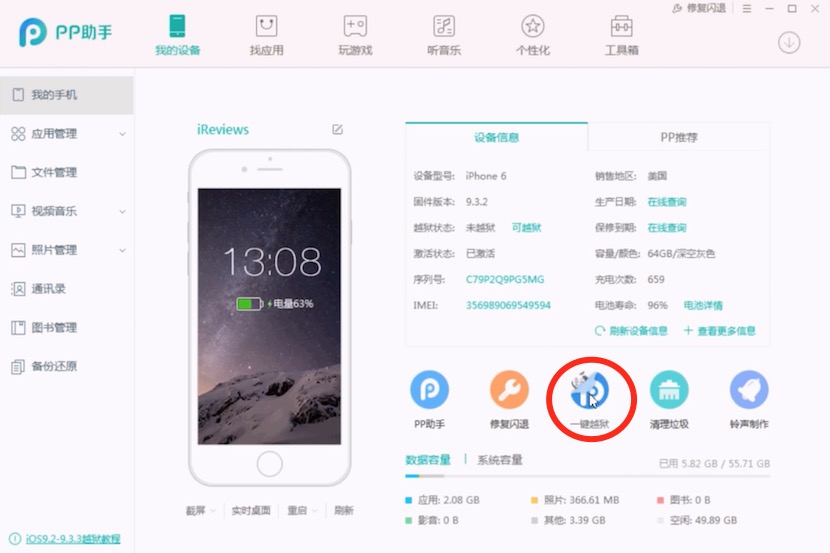
You should see a screen like this, forget about everything that appears in Chinese and go directly to the surrounded with red circle icon. Click on it so that will install the application on your iPhone or iPad.
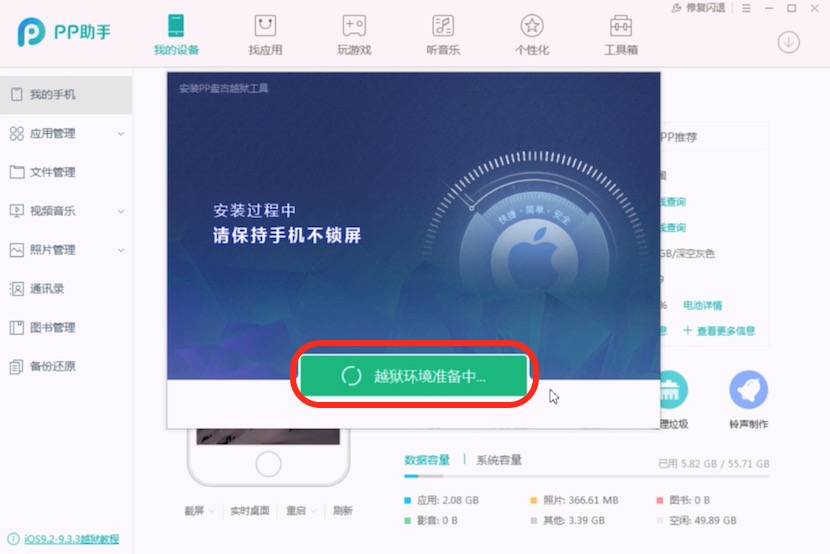
This new window will appear, click on the green button, and wait for the application to be installed on your device, which will take a few seconds. During this process you will be prompted to enter your AppleID and password. While Pangu says that it is only necessary to install the necessary certificate on your device, do not recommend that you use your Apple account to do this. Create a non-associated credit card account and use it for this, so if someone gets that data you can not use them to make purchases or access all your data in iCloud.
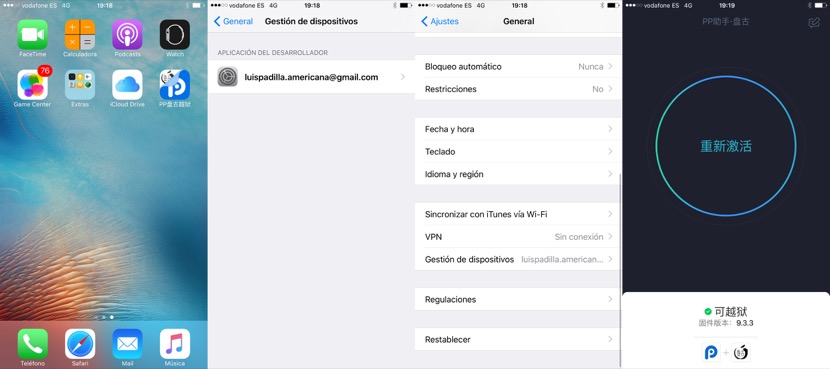
After a couple of minutes you will already have the application installed on your springboard, but before use should make a preliminary step so the system rely on it. Enter the settings menu > General > device management and click on the certificate that appears with your AppleID (which usasteis in the previous step), and click Trust to run the application. Now that you can run the application. To the open it will appear a great button central, click on it, bloquead the device and wait to restart. Spend a couple of minutes until this occurs, so calm and patience. A time has rebooted already have Cydia on the springboard fully functional.
Repeat the Jailbreak whenever reboot
Is is of a kind of Jailbreak “Tethered”, a word that the more old of the place safe that know. Not is entirely true, but if that occurs that when restart the device not works Cydia, or will have none of those tweaks. Not you worry, only there is that press again on the application PP25 that is installed in first place and in some seconds your iPhone is locked and will have again Cydia and all your tweaks installed. To enjoy from Cydia.
PREPARING TUTORIAL IN VIDEO…


