Apple is one of the platforms, not to say the only one, that updates so common and quickly all your devices, something that already want all users of Android phones, except the Nexus range. But the problem that is is Apple with their updates is that many users not want to update to the last version to not lose the jailbreak. But Apple that gives you exactly equal and in the latest versions of iOS Apple automates updates in a way that if press where we should not, our device can be updated quickly at night unless we realize and thereby lose the jailbreak.
Formerly the software used to jailbreak automatically blocking updates detection by what didn’t have to worry about that. But it seems that these guys from Pangu do not and more than one user has complained that it has lost the jailbreak to receive notification of the latest update and click it, without taking into account that it would lose the jailbreak. Fortunately Apple still signing iOS 9.3.3 so it is possible to downgrade and return to enjoy the jailbreak of Pangu.
But if want to avoid us trouble, especially for when Apple already not firm that version, must make use of the tweak mikoto, a tweak that us allows block the checking of updates of the system. This tweak is the repo https://cydia.angelxwind.net/, we have to add to Cydia. Once installed, reboot the device and headed to the tweak settings, located within settings.
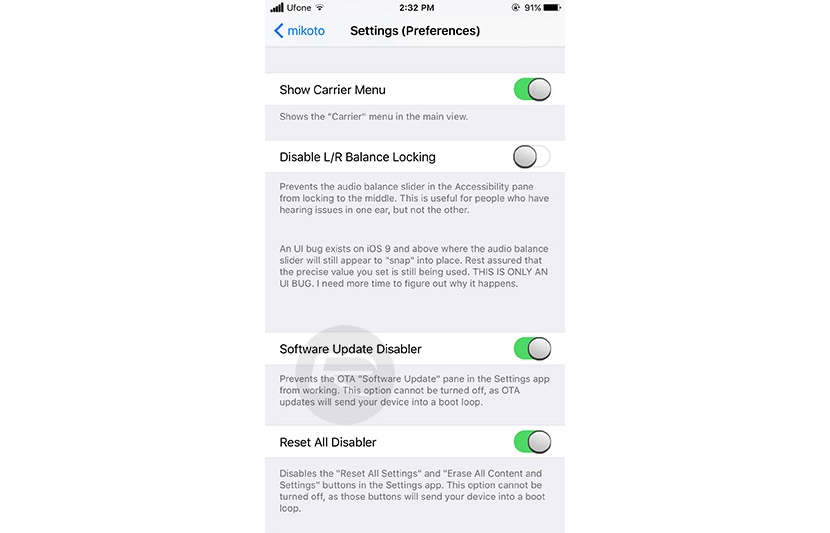
Among all the options that the application shows, should enable Software Update Disabler, this form of updates via OTA (Over The Air) not shown in the device settings and we can be calm about that won’t lose jailbreak unless our device is in the past and we are not obliged to perform a clean install of the latest version which is signing at that time.


