macOS Sierra already carries some few days between us of form official and this time has served to go discovering different small changes that includes facing versions previous of the system operating. Some of these changes are positive, while other are not so much and today we want to talk about one of these negative points.
From makes already some versions of macOS (before OS X), in the paragraph of security can define the origin of the applications that allow that is installed in our team. This function is called a Gatekeeper and is intended to improve the safety of our teams.
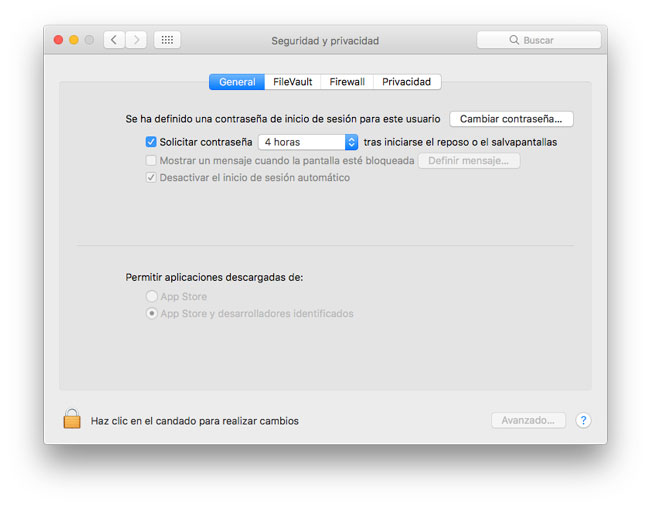
Until now there were three possibilities to choose: App Store, App Store developers identified and any site. But the arrival of Sierra has done that the last option, any site, disappears from the list.
This change is that now we can not install apps that are not signed by Apple, which means that we can not install many open source programs not signed or even programs that we need to build them ourselves. This hand is a safety advantage, especially for users with little knowledge, but puts us in trouble we need to use software not signed by Apple and we perfectly know its origin and is not malicious.
How enable the installation of software from any site in the Gatekeeper of Sierra
By luck still exist a mode of Activate the option any site of Gatekeeper, although for this must resort to the Terminal as show below.
1. the first thing to do is to Open a window endsl (located in applications – utilities, but also accessible from Spotligh).
2. in the window that is open type the following command:
sudo spctl --master-disable
3.-we will request the password to confirm the change. Enter it and press the Enter key.
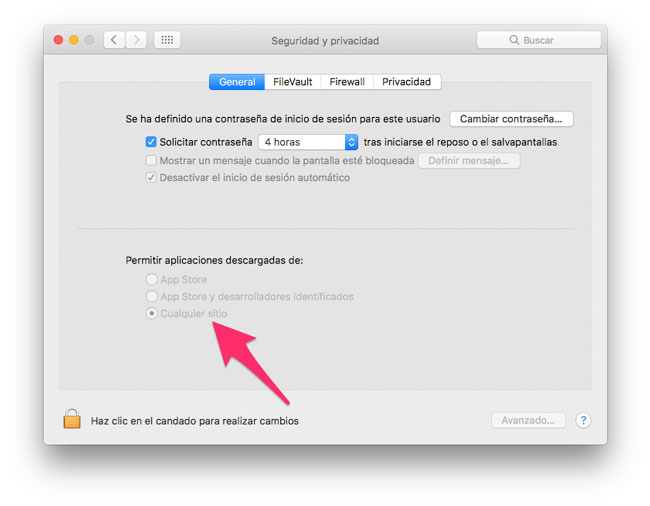
And ready. After perform these three steps, if we return to preferences of the system – Security and privacy can see as the option any site (or Anywhere in case of have the system operating in English) will be marked.
We want to think that Apple has made this change in Sierra with the safety of the users, and is not the beginning of “close” macOS only accept apps in the Mac App Store as it is currently running iOS. A motion would thus be terrible for current and future Mac users.


