For now it seems that users who continue enjoying jailbreak of iOS 9.x are fortunate ones, since at the moment is not observed on the horizon any jailbreak close despite of Luca Tadesco demonstrated by active and passive can be, even through Safari, so users have certain doubts about the possible arrival or not jailbreak versions that exist of iOS 9. At this rate will reach 10 iOS and continue without being able to enjoy the jailbreak, it seems to be the beginning of the end of the jailbreak.
But although it may not be to the latest version of iOS, there are still users who have jailbroken on their devices, and those fortunate enjoy tweaks such as that I am presenting today, which allows us to establish a different volume for the application that you launch on our device.
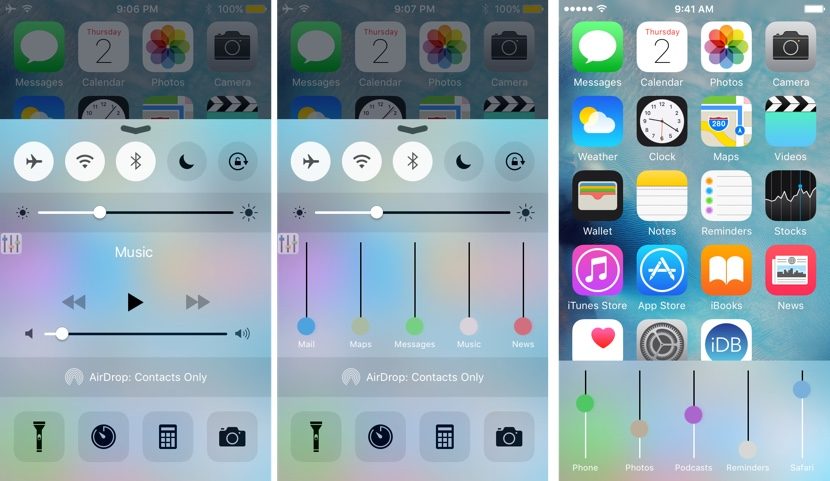
We are talking about VolumePanel, the ideal tweak for many users who are tired of having to adjust the volume quickly when you open an application, we make a movie, we have to lower the volume of the iPhone, we launch Apple Maps to navigate, run Apple Music or other music streaming player… This tweak allows us to adjust the volume for each application that you launch independently.
To run VolumePanel the developer offers you two options: through a gesture with Activator or by adding the information to the control center, so that each time that you execute it can access and modify the volume of applications. The problem of making use of it through the control center is that it is located in the playback controls, which will force us to make one touch more on the screen to be able to access and modify settings.
The tweak VolumePanel is available in the repo to BigBoss for 1.49 dollars and is only compatible with the iPhone and iPod, none of the iPad at least for the time being. It also requires a minimum of iOS 8 to work.


