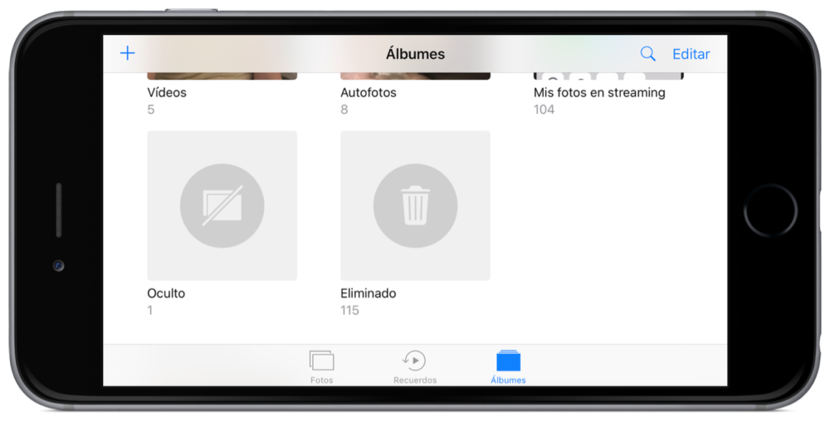
 As any user in the world, certainly in the reel of photos from your iPhone, iPod Touch or iPad you have some images that you do not want that nobody sees. IOS reel we can see all the photos that you have stored locally from the spool folder, which is fine when we see ourselves, but that is no longer so much if we want to show everything we have… less some images. In these cases, the best is to use a function available in iOS that will allow us to hide the photos private.
Actually, hide photos is something very simple that was also available in previous versions of iOS, but it is very likely that we do not know if we haven’t stopped to try options. If I have to be honest, I seem more intuitive to hide pictures if not it agreed to the option where it has but, once we know the way, has no loss.
Hide photos of iOS from the share button
To hide the photos in iOS only, we will have to follow these steps:
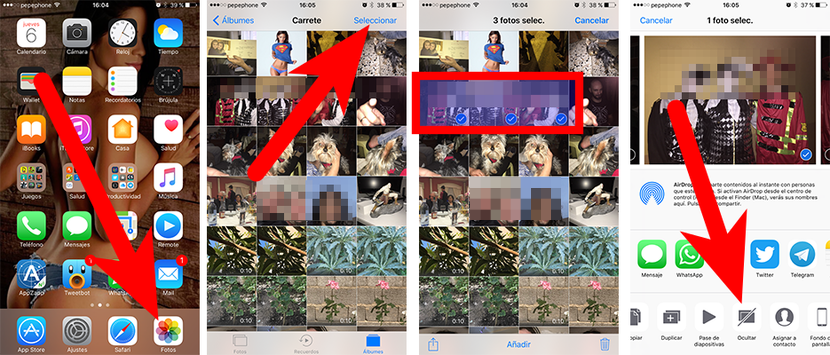
- Open the photos app.
- We access the spool folder.
- Now we can do two things:
- If you only want to hide a photo, we can open it and then go to step 4.
- If you want to hide some photos, we touch on the Select button, select / Mark all the photos that you want to hide and go on to step 4.
- Then, touch on the icon of sharing that is in the corner bottom left.
- Finally, choose the option Hide.
At this point I think it is important to explain that the images will not disappear or be protected with password or fingerprint (which wouldn’t be too bad, Apple). The images that we hide will go to a new folder called hidden that, like recycle, will not display any image until we go to the folder.
On the other hand, if you are Mac users, we can also hide photos in macOS, but in this case we will have to select the photos that you want to hide, right click and choose the option to hide the photo.
Would already know how hide the images of the reel in iOS and macOS?