Having two numbers of WhatsApp on your iPhone is something that many surely come to Pearl to avoid having to carry two phones, but implementation of the messaging service is limited to a number per device, and it is impossible to install two WhatsApp applications in your iPhone, or at least so far, was because there is a very simple way of doing it and don’t need to be a developer to do this , or have done Jailbreak. Explain what you step by step with images and all the necessary instructions.
Requirements
Are going to use WhatsApp ++, an application not official that until now only was available for devices with Jailbreak, but that now and thanks to Cydia impinger is can install easily in devices without Jailbreak made. To do so we need:
- Cydia Impactor, which you can download it for Mac, Windows, and even Linux from this link.
- WhatsApp ++, whose “ipa” file you can download from this link.
- A smartphone with the phone number which we will use in this new WhatsApp, where will send us the message with the activation code.
- An Apple account, it is not necessary to be developer.
Procedure
With the iPhone connected to your computer via USB cable (always advisable to be original or certificate to avoid problems) run Cydia Impactor. In the window of the application we must appear our iPhone to certify that it has detected correctly.
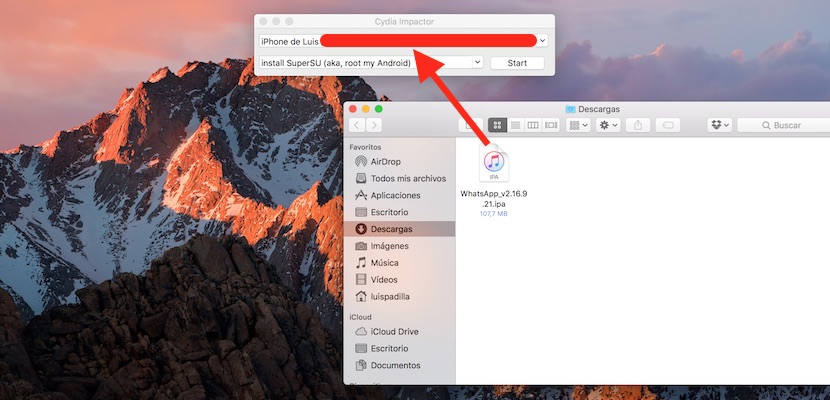
Only thing you need to do is drag the file “” downloaded ipa before the window of Cydia Impactor, and the process of signed to install it on your iPhone will automatically start. Our user of Apple and the password we will ask then. Can use the your of always, not is necessary that is of developer, or create you a without card of credit associated to these purposes, that is what I personally recommend.
After a few seconds the application will be filmed with your account and in addition there will be installed in your iPhone, without having to use Xcode or iTunes, or complex procedures of installation of certificates or anything similar. But still not have finished, because to to use it before there are that give a couple of steps more.
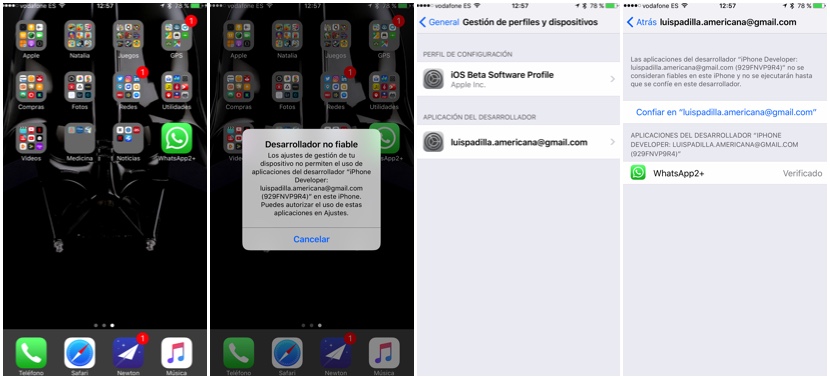
If you execute the application that has just appeared on your springboard you will come the message that the developer is not reliable. Enter in them settings of the system, in General > management of profiles and devices, click on the profile of yours has that have used to Cydia Impactor, and then click in “trust”. Already that you can use the application WhatsApp ++ with another number of phone different to the main of your iPhone.
WhatsApp ++, more configuration options
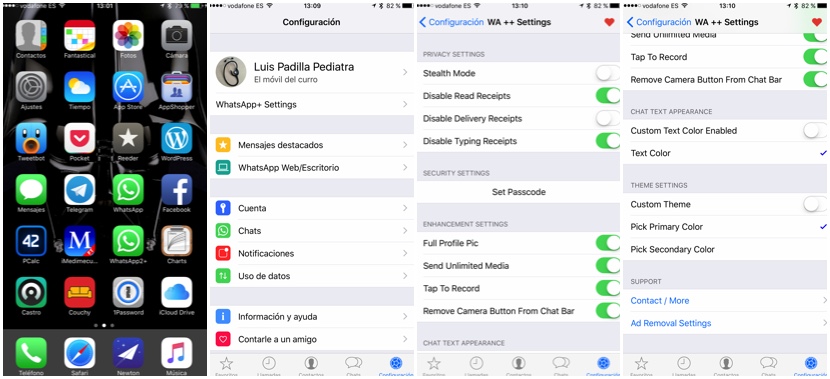
This application is a vitamin-enriched WhatsApp, with more configuration options than enjoy the official app. This Setup menu is accessed from the tab “settings” that you have down to the right, inside the application itself, and just below your profile you will see the “WhatsApp ++ Settings” menu, with settings such as text color, be able to send unlimited photos, customization of the topic, etc.
Limitations of WhatsApp ++
All not can be perfect, and have this application installed in your iPhone has some disadvantages:
- This procedure is valid for a week, since it is what takes the certificate of “free” developer. If you have official developer account and you use it in Cydia Impactor lasts a year. A time expires you will have that return to repeat the procedure from the beginning and return to install the application signed with Cydia impinger.
- Push notifications don’t work well, sometimes come without problems but sometimes fail, so you will have to enter the application to see if you have messages periodically.
- Once you activate your WhatsApp account on the iPhone, you can not use that same account on another phone or will deactivate and will have to set it up.
- It would not be the first time that WhatsApp blocks to users who use non-official uses, is a risk you should know before you start using WhatsApp ++.
Despite all these drawbacks, many of us are grateful to have another account of WhatsApp to our device and save us having to carry another phone over.


