
He had his small moment of glory during the last Keynote, but it has gone somewhat unnoticed since. The Remote app is available in its first Beta since the release of iOS 10, from the developer portal. During these days I have been testing it with the Apple TV’s fourth generation, and finally we can already say that we have a perfect Siri remote substitute thanks to our iPhone and this application, which will soon be available to everyone. I tell you how it works and the different utilities that can be given.
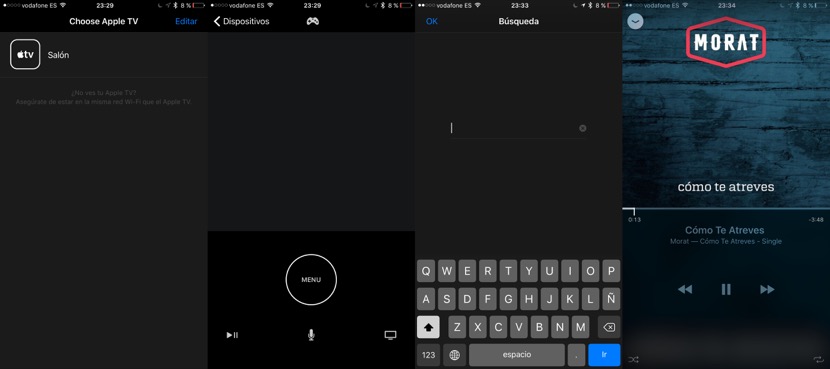
The first thing that must be done with the Remote app is connecting to your Apple TV. For this you must you have your iPhone connected to the same WiFi connection to Apple TV, open the application and choose the corresponding Apple TV. It must be a new 4th generation Apple TV, don’t work the previous models. That, to use the application, it is not necessary that you have iOS 10 or tvOS installed 10, works perfectly with the current versions of both operating systems.
What you can do with your iPhone Remote app? Then virtually the same as the Remote Siri and anything else. As you can see in the image, the screen of the iPhone becomes a Remote Siri, in the absence of volume buttons, which are its main deficiency. Not to be infrared iPhone can not control the volume of the TV, but otherwise all functions remain intact:
- Navigate the Apple TV using gestures to which 2/3 superior screen of the iPhone become the equivalent of the touch surface of the Remote Siri.
- Use Siri thanks to the spoils of microphone.
- Use the dictation by voice to write text and passwords.
- Use the iPhone keyboard to write text. So when you have to write a text will be shown directly the keyboard on the screen of your iPhone
- Control music or video playback
- Use your iPhone as a remote control of video games: not only because of the accelerometer and gyroscope for the iPhone, but because in addition Siri Remote touch controls are simulated on screen.
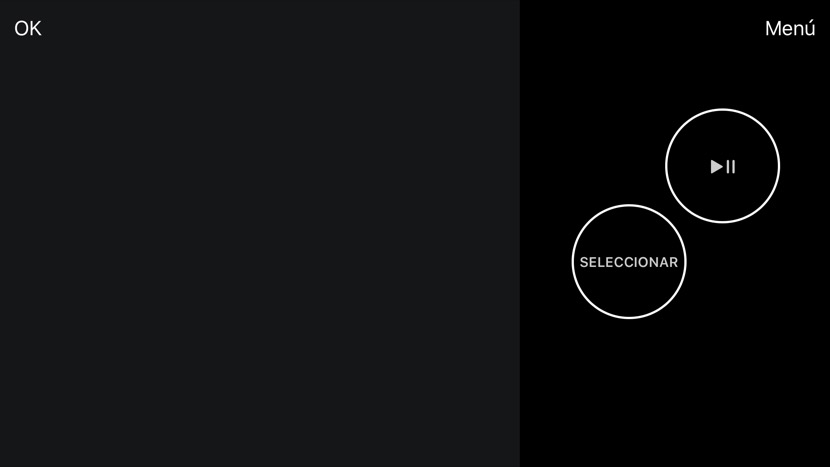
In addition if subject in horizontal iPhone, the screen displays an interface more suited to the games, with a huge tactile surface on the left side and two buttons on the right. You will not need a second Remote Siri to play with a friend on your Apple TV. The application is not yet available for download from the App Store, but are expected to soon reach the Apple app store and anyone who wants it can use it. We will be notified as soon as it becomes available.


