Spammers continue to seek ways to reach with your message to more people better and in recent weeks they have begun to use a new channel for this purpose: invitations to events from calendars and photos shared in iCloud.
At the moment there is no real way to stop this spam to 100%, since these iCloud functions do not have a spam filter as Yes in the email. Luckily it has appeared a method that can help us stop it in part and in the following lines we explain how it works.
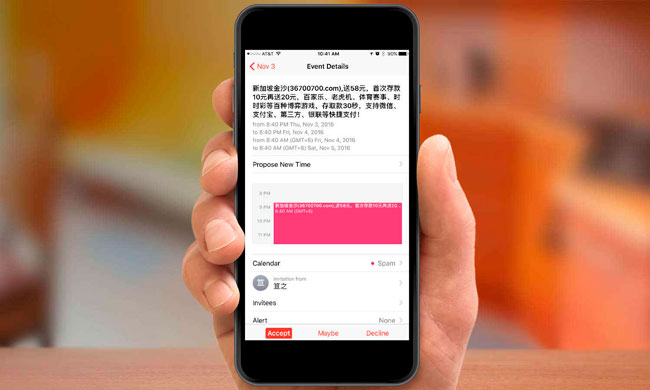
The method you are using spammers is sending invitations to events through the calendar of iCloud or invitations to share a photo with us. In this way may send the information who want us to see, with so-called offers, links to websites, etc, etc…
By default not have form possible of avoid that this occurs and if us decided to by touch on the option reject to the receive an of these invitations, you are giving tracks to the spammer of that our has of iCloud is active, since receive the response. That could make that our email from the service end up in a list of users active and the volume of shipments increase.
Taking in has this situation, from AppleTips, explain a method that can used to, at least, them spammers not receive the response of rejection and not know that our has is active. Basically the method consists in saving all those invitations in a calendar created for this and then delete it by full. Of this form our email could end in a list of accounts inactive and could leave of send us spam, although of course not can make to the 100% that this go to pass.
Steps to “stop” the spam through invitations from calendar and photos shared from iCloud
To avoid sending rejection response of the invitations that we receive through the iCloud calendar must give the following steps (we explain it with examples from iPhone, but of course this can do the same on iPad, iPod Touch, Mac or directly on the website of iCloud).
1.-open the app calendar and play on calendars in the part bottom of the screen.
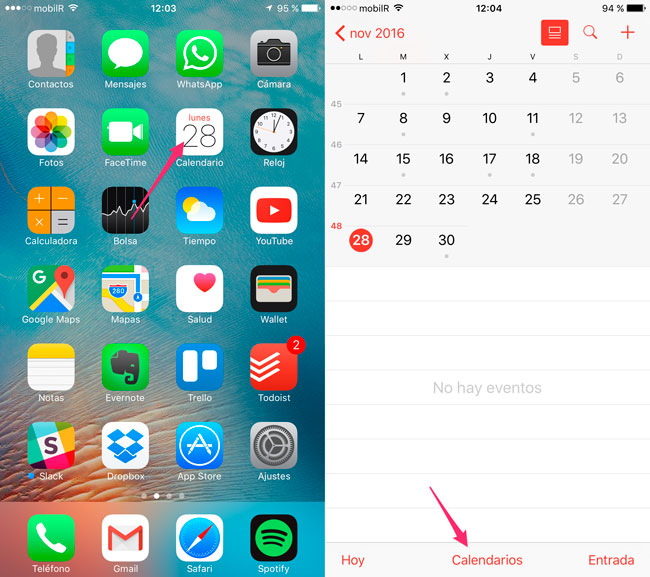
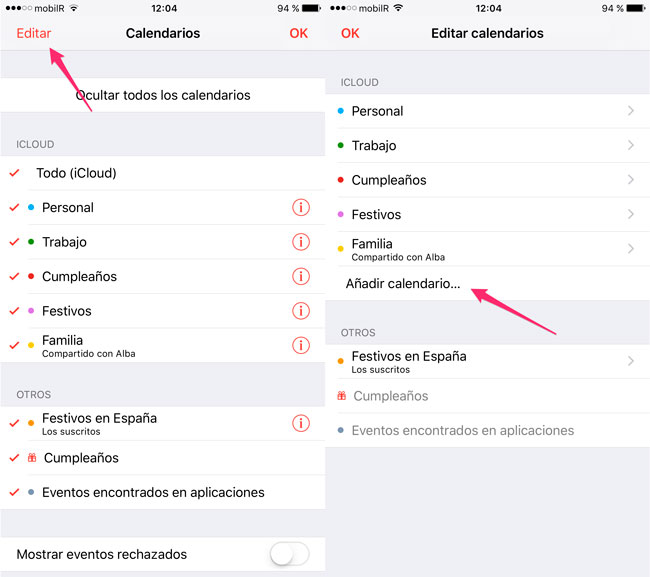
2.-touch on the button Edit in the corner top left of the screen and then on Add calendar…
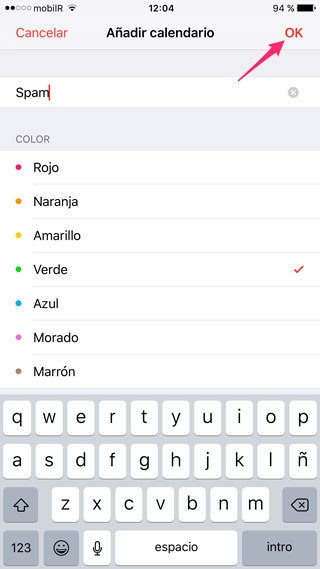
3.-put a name to the new calendar that will host all the events spam that go to receive. In our case it will call Spam and touch on the button Ok up to the right to create it.
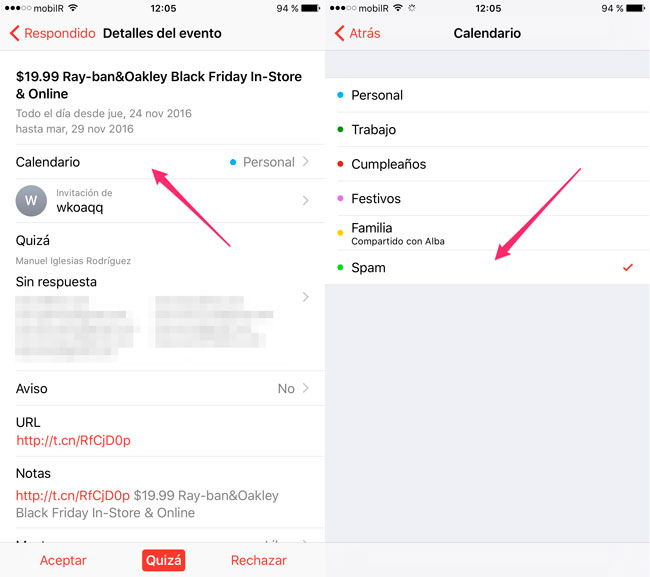
4.-open the invitation spam playing on it and in the paragraph calendar choose which just of create. Repeat this step with all the invitations of spam that have in hopes of response.
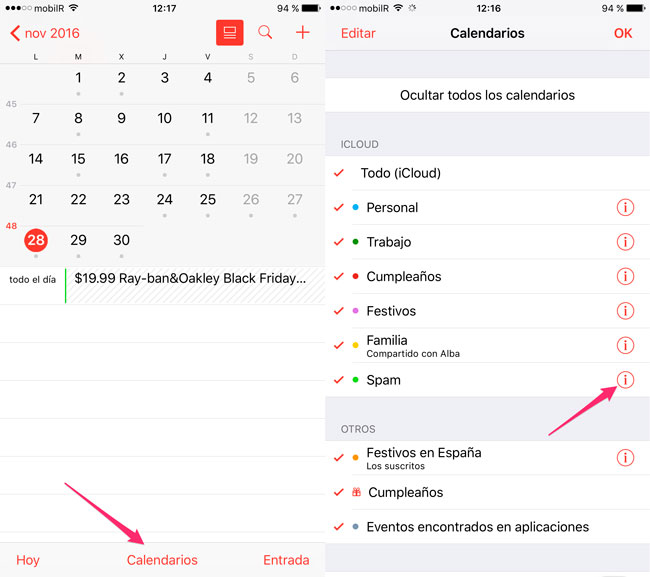
5 return to play on calendars in the bottom of the screen and touch on the information icon beside the name of the calendar Spam.
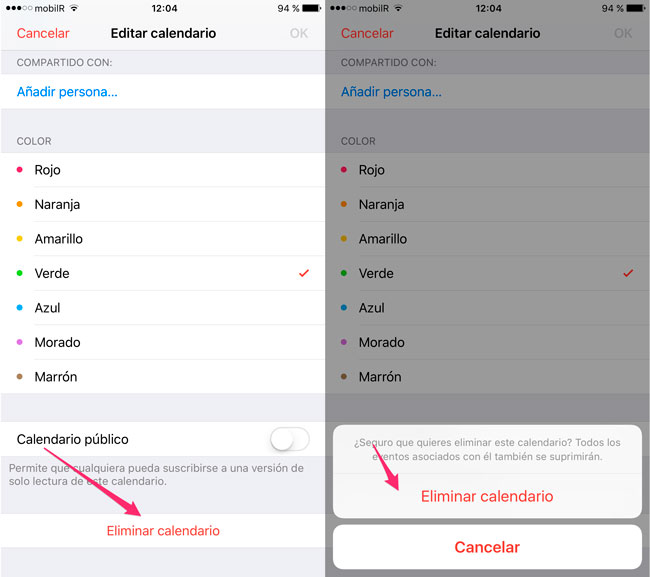
6. we move to the bottom and touched on the option delete calendar. A message of confirmation in which we touch again on the option delete calendarwill appear.
This is all, when performing these steps get eliminate the invitations of spam and spammers will not get any kind of response from our account. As we said, this could be done to stop us trying to send spam to see that any kind of activity there is.
In the case of receiving invitations for the use of shared icloud photos there is not much we can do. The only way to stop receiving these invitations right now is disable the feature, something we can do by going to settings – iCloud – photos on and off option shared photos in iCloud.
We assume that at this point in Apple they are aware of the problem and hope that take most soon launch any solution. At least one option to report invitations as spam and that they are blocking access to iCloud spammers accounts.


