For a long time that we didn’t have good news in the world of the Jailbreak and now, finally, we can go to talk about it. For the last few days it is possible to apply on some devices and in the following lines we will explain How to Jailbreak iPhone, iPad, and iPod Touch with iOS 9.3.3, the latest available version of the operating system.
The Jailbreak was released initially by the Chinese group 25pp, although it is now also available from the hand of Pangu and we will explain the steps to do so with the instructions of the latter. The reason for the choice of Pangu is confidence and that they carried years giving us Jailbreaks that work well and there is no reason to doubt them on this occasion.
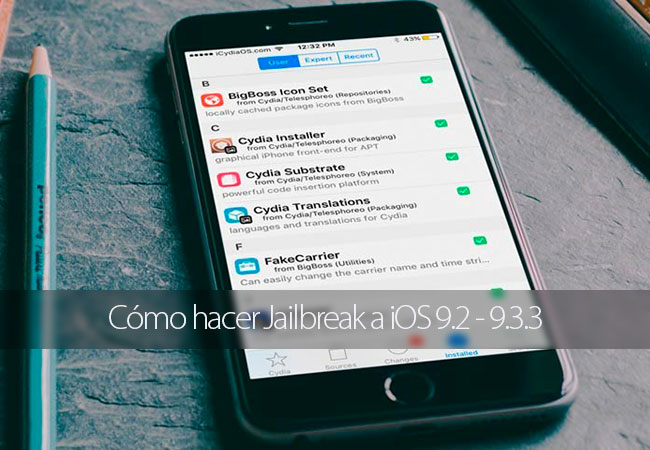
Before getting into flour and explain all the steps to get the Jailbreak we must bear in mind some things. On this occasion is not a jailbreak untethered, but which is semi-untethered. This means that we will have to re-do the process explained below last a few days, since the necessary certificate expires a few days (7 to be specific).
Devices compatible with the Jailbreak of iOS 9.2 – 9.3.3
In addition, the Jailbreak is only compatible with devices with 64-bit processor, which means that the iDevice Jailbreak of iOS 9.3.3-compatible are the following:
- iPhone Plus 6s
- iPhone 6s
- iPhone is
- iPhone 6 Plus
- iPhone Plus 6s
- iPhone 5s
- iPad Pro 12.9 “
- iPad Pro 9.7 ”
- iPad Air 2
- Air iPad
- iPad Mini 4
- iPad Mini 3
- iPad Mini 2
- iPod Touch (6th generation)
Other devices that run iOS 9.3.3, but do not have 64-bit processors are not compatible with this Jailbreak and we do not believe in the near future it will get another that Yes it is.
Requirements for jailbreak iOS 9.3.3

This Jailbreak is somewhat different from those we are used and as a result initial requirements for doing so are. This is what we need:
- Download the certificate NvwaStone_1.0.ipa that offers Pangu through its web.
- Download the Cydia Impactor tool. This tool is used to sign the previous certificate, was developed by Saurik (the creator of Cydia) and is available for macOS, Windows, and Linux.
- An Valid Apple ID. At this point we can use it that we usually use or create a new one to apply the Jailbreak, that decision left it in your hands.
- Newly refurbished device. This point is not essential to do so, although it is true that this way can avoid many problems and increases the success rate significantly.
- It is also recommended, although not required, disable the unlock code from settings – Touch ID code, and also find my iPhone from settings – iCloud – find my iPhone.
Steps to follow to do the Jailbreak of iOS 9.2 – 9.3.3 iOS for iPhone, iPad or iPod Touch
Once we are sure to meet the necessary requirements to do the Jailbreak, we can get into stuff and start with the steps necessary to achieve this.
1. the first thing to do is unzip and run (as administrator in case of Windows) tool Cydia Impactor.
2 connect the device to the computer with the USB cable. Ask us If we want to rely on the computer and we say yes.
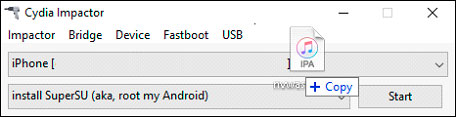
3 drag the file NvwaStone_1.0.ipa downloaded from the website of Pangu Cydia Impactor window and click on OK in the message that appears.
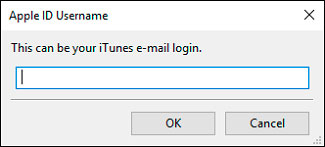
4. now you have to enter the email associated with our Apple ID.
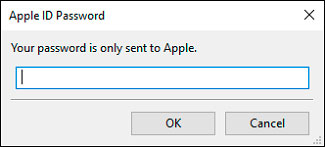
5. after the Apple ID is required to enter the same password. If we do this correctly Cydia Impactor will work, will show a warning that we must accept and automatically sign the certificate (this is necessary have the computer connection to the Internet). In case of error it is likely that the Apple ID or password have been entered incorrectly.
6. after the installation of the certificate, we must go to settings – General – profiles and devices, touch on the profile that you just installed Cydia Impactor and touched on trust.
7. now on the main screen of your device iOS will be shown a new app called Pangu. We must open this app and touch on the Startoption.
8 after a few seconds the device will restart and restarting we will see that Cydia is now available and ready to let us install tweaks and apps not approved by Apple.
As you can see the process is somewhat different than usual, but actually following in the footsteps one-on-one not should be a problem for anyone applying 9.2 – 9.3.3 iOS on a compatible device iOS Jailbreak.


