One of the most common complaints among users of iPhone, iPad and iPod Touch is focused on iTunes. The bootloader of iPhone and other iOS devices offered by Apple does not like many people and why today I want to talk about an alternative of iTunes for Windows: WinX MediaTrans.
Thanks to this software it is possible to do many of the things that allows iTunes without having to go through restrictions and “standards” imposed by Apple software.
Thanks to WinX MediaTrans can, for example, transfer photos of an iPhone, iPad or iPod Touch to a folder of our PC, manage the music of our devices in sense iDevice-PC or PC-iDevice, besides to create and manage lists of reproduction, delete songs loose, etc, etc… But this is not all, but software also enables us to manage the videos stored in your device and, finally, use memory internal it as if it were a flash drive.
It is true that this is not the only software of its kind that exists, but it is the fastest and most stable of all that they have been tested. This is, without a doubt, one of its main advantages over its competitors and certainly appreciate the agility with which allows us to manage our files.
How to transfer music from an iPhone or iPad to a PC without iTunes
He mode of operation of WinX MediaTrans is very simple and believe that the best form of show it is with an example.
In the following lines we will explain How to transfer music from a PC with Windows to iPhone 6s Plus without using iTunes in no time (even though it is necessary to have it installed so the computer can recognize the device iOS).
The steps to do this are very simple:
1. the first thing to do is to download WinX MediaTrans from its official website (there is a full version of test), urge him and open it:
http://www.winxdvd.com/mediatrans/index-es.htm
2 connect your iOS device via USB cable to the computer.
3. as soon as the software recognize it just click on the Music Manageroption. This section of the software opens and will show us the list of songs stored on the device.
4. now, to add new songs, the only thing we have to do is click on Add music and select the songs that you want to add in the window that appears. Another option is drag the songs to the window of WinX MediaTrans.
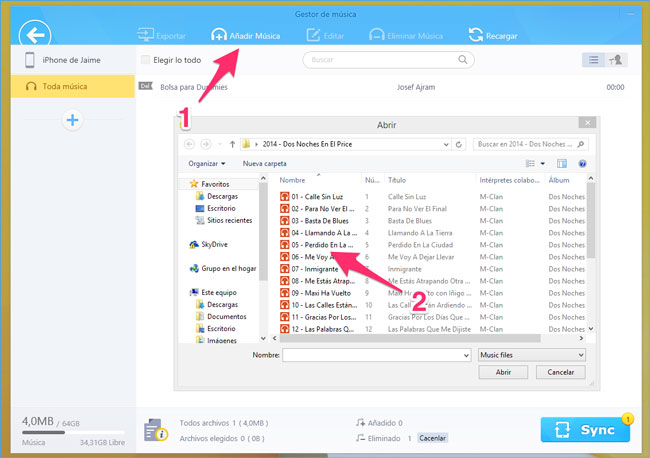
5. the software will begin to analyze the songs and once finished will show us the complete list with all the songs. In addition, at the bottom right we will see a big blue button with the text Sync and a fair number to the side. Click on it and the timing of the music will begin.
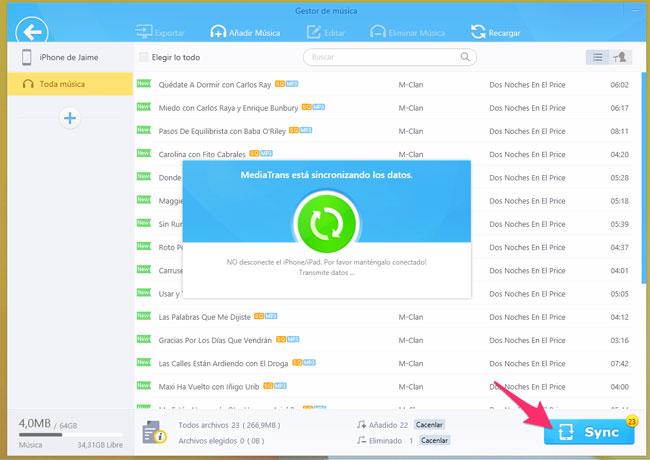
This is all, with these simple steps will have synchronized our favorite songs with our iOS device without using iTunes in no time.
In addition, if it wish can do exactly what contrary: pass music of a device iOS to the computer. This iTunes not it enables, but with this alternative can do it without problem.
So the only thing we have to do is Select the songs that you want to store on the computer in the music Manager and then click on the option export. Easy and very fast.
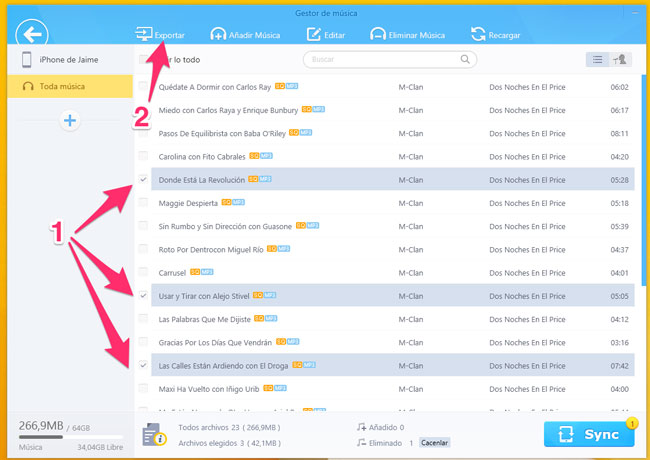
This is just one of the possibilities of the software. Management photos, videos or the option of using an iOS device such as Flash drive are also present and its use is very easy and intuitive.
WinX MediaTrans is a software of payment, but is possible try it in full thanks to the version of test that offers. This can be downloaded from the official website of Digiarty Software without any charge:
http://www.winxdvd.com/mediatrans/index-es.htm
You can also take advantage of the special offer for a limited time and get the version full WinX MediaTrans 16.95 euros.
What did you think of this alternative to iTunes? Are you of those who prefer to manage your multimedia files with Apple Manager or prefer alternatives like this?


