As a general rule to uninstall programs on Mac , what we do is drag its icon to the trash. This is what recommends Apple and the mechanism that the computers of the company also includes, but is not really the best way of doing it.
The reason is that doing so in this way we left orphaned in the operating system files. Files that stored the configuration that had in the software deleted, that saved the license of user, files of cache, etc, etc… The problem is that over time these files accumulate, taking up space on the hard disk or SSD drive and making the computer work increasingly slower.
It is why us we like to use uninstallers to avoid this situation and I want to talk about that, for us, is the best that can be found nowadays: CleanMyMac 3.
The advantage of using it is that to the uninstall applications in Mac with it is deleted all them files of the software distributed by the computer and not will be remains accumulating is unnecessarily.
The best way to uninstall applications on Mac
The mode of use of CleanMyMac 3 to delete programs in Mac is really simple and it explained below.
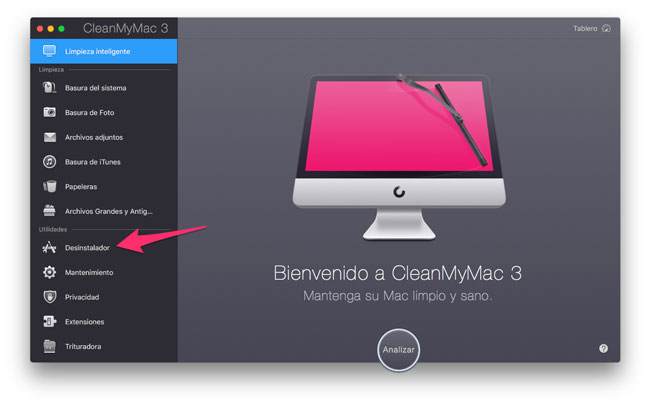
1.-the first that must do is open CleanMyMac 3 and access to the utility uninstaller.
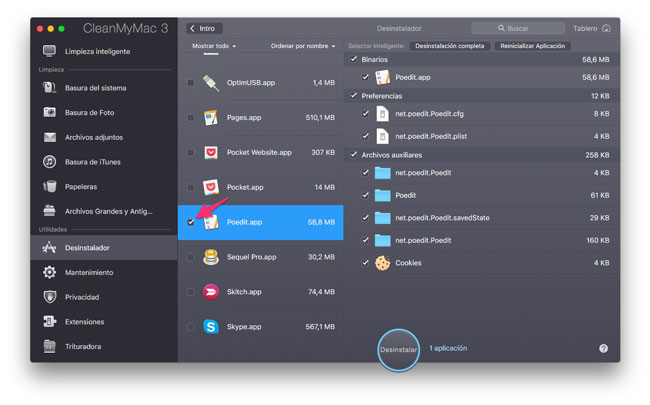
2. Once inside the utility, the software will show us a list with all the programs installed on your Mac. Seek in the list which want to uninstall and mark the checkbox that appears just to your side (if want can mark several and uninstall them all together).
3. Finally, click on the button to Uninstall that appears at the bottom center of the application window.
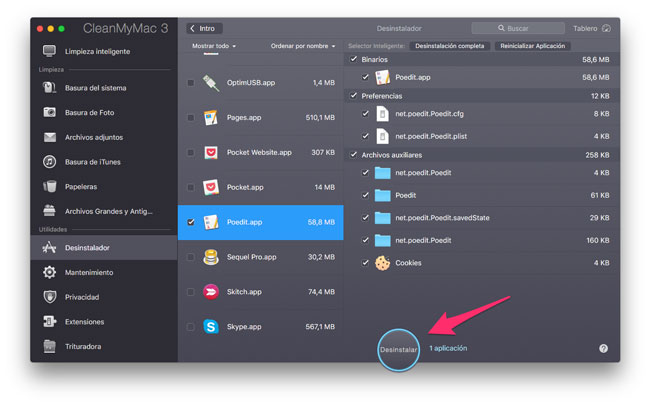
This is all, click on uninstall will delete full program and all files that are distributed by the system of storage and now it will not need to remove the software.
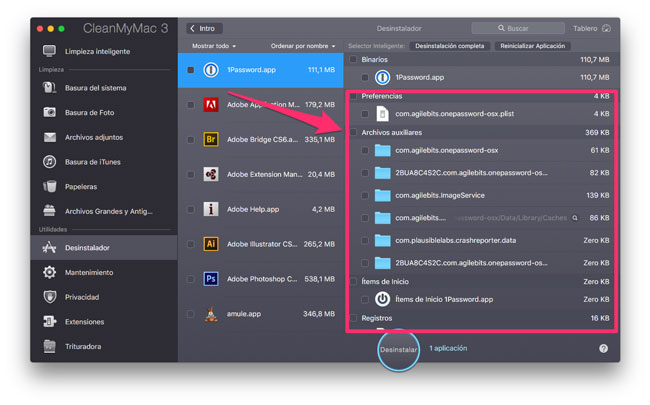
By clicking on any of the installed apps will show us the complete list of files that will remove and your current location. Thanks to this feature we can realize the amount of files that would be “forgotten” If you uninstall programs by simply dragging to the trash. In the following image you show an example with the application 1Password, if simply arrastráramos the icon to to the paper the only file that is would eliminate is which is within the category binary.
Always said that uninstall programs in Mac is as simple as dragging them to the trash and to some extent it is true, but if we want to maintain a clean and optimized operating system for a longer period it is advisable to resort to uninstallers as mentioned (which also helps to perform other maintenance tasks on our Mac).


