
In this post I will talk of something that I think that is more a Council or tip that a tutorial. To gain access to Scribble even when not officially in Spanish will have to change the language at the time in which we are going to send a message, something which we will access by pressing firmly onto the screen of the Apple Watch. Not to confuse you, we will detail the steps to follow.
Send messages with Scribble in Apple Watch
- The first thing we have to do is to access a messaging application. If we have your native version installed on Apple Watch, we can access it from the watch. If not, as it is the case of WhatsApp or some application that you have not installed the Apple Watch, will have to wait to receive a message.
- Once where we write messages, which can be a notification of WhatsApp, in which case we will touch on “Reply”, we will see the options available. Usually you see the available emoji, stickers in applications such as Telegram and the microphone icon, which will pick up our voice and transcribe it to pass it to text. At this moment we have to forcefully press the screen.
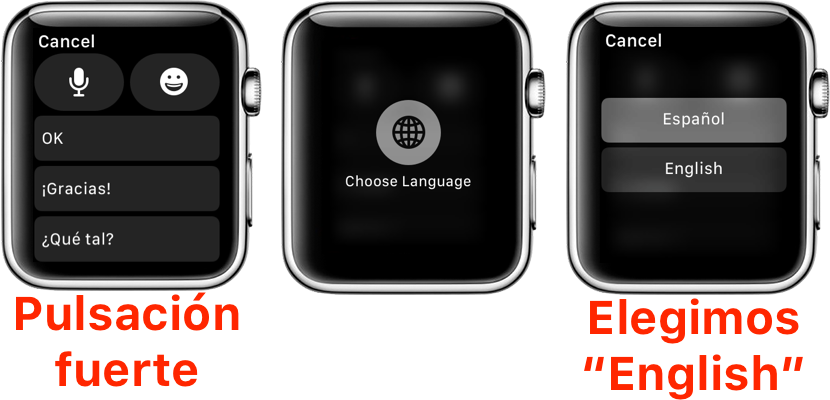
- Then we played in ‘Choose language’ or ‘ Choose language ‘.
- Of the available options, we chose “English”.
- At this time will be shown a new button over big with the text “Scribble”. We touch on it.
- Finally, we already wrote that want to send and touch on “Done”.
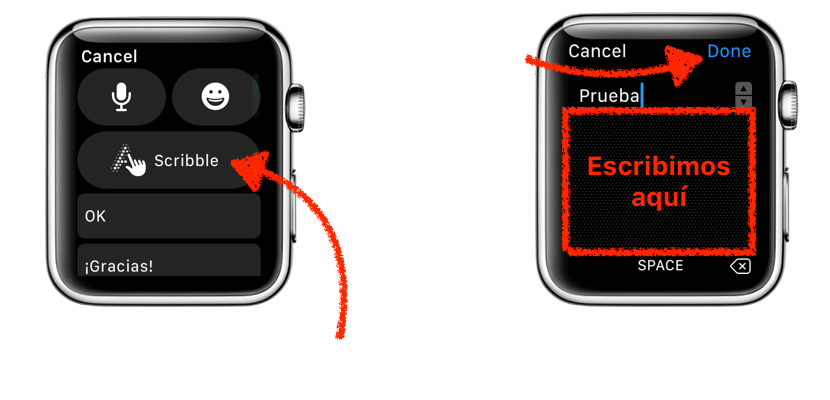
It must take into account that we will be writing in English, which means we can not write accents or the symbol opens a question, for example. Will also have to get used to writing commas and some symbols, since the most normal thing is that at the beginning we appear the letter L or J. In any case, I’ve been a time using it and I had no major problems. How have you fared to you?


