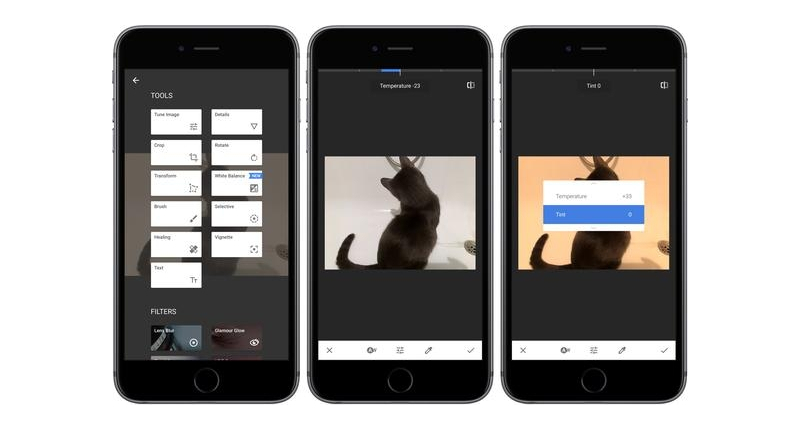
(Owned by Google) application for editing images, Snapseed, updated last Wednesday on the App Store with a trio of improvements that brings the new version of the application. The first change affects the user interface to make easier and easier to select and change the parameters of filters. The second novelty is, basically, a dedicated tool that was launched on Android some time ago and which adjusts images white balance. Finally, the last added feature is a correction for the development of the RAW files with embedded color profiles.
In addition to slide up and down to adjust parameters of filter images, now also setting on the bottom icon you can click to bring up a selector of the selected filter parameters. The selected parameter is always shown with a slider at the top of the screen. As it was happening so far, also you can slide to the left and the right in any part of the image for adjustments. On the other hand, the dedicated white balance tool allows adjusting colors in images to achieve a more natural look: you can use the AutoCorrect option or make changes with the color picker included that allows a more precise control over the option.
Finally, when opening RAW images that have been captured with different configurations of the camera, Snapseed will now show RAW default colors. Google shows about it so far, the “color profiles integrated limited the creative options when editing RAW files then”. Snapseed is compatible with editing RAW images in 10 iOS devices, with support for RAW files from 144 different models of cameras. RAW allows you to work with the original image data as have been captured by the CMOS sensor before that happens any post-processing on the photograph. This, which allows is an accuracy unequalled at the time that there are details that probably neither knew existed. For example, change the exposure in a file of image RAW in Snapseed has an effect comparable to the adjustment of the configuration within the electronic of the camera.
With RAW in Snapseed, you can lighten shadows, recover lost light areas, add structure and detail of the original RAW data, apply thin white balance adjustments to the RAW data and much more.


