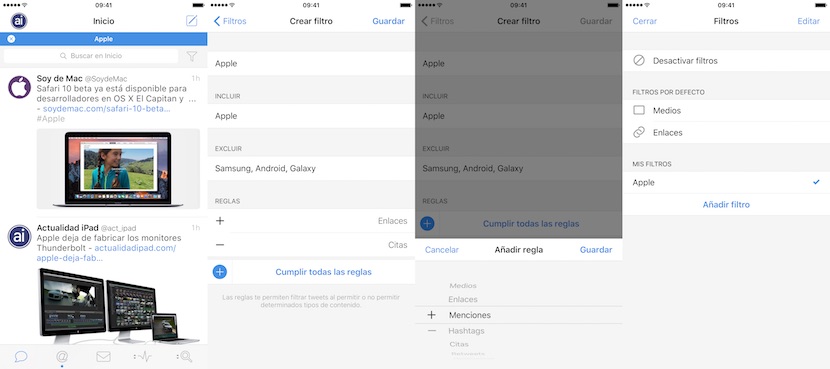
Tweetbot has been updated and again demonstrates why he is the best available for iOS Twitter client. On this occasion have added several improvements to the application, but on all of them is the possibility to add filters to your Timeline. A new and powerful tool that is completely customizable and allow you to clean your timeline to focus only on what you are interested in. We show you these and other improvements then.
While Tweetbot was already available filters, the new update allows you to create own filters with many configuration options. You can create keywords, which are mutually exclusive or that include only tweets that have them, and also define rules must be met, even set up if you want to include all rules or just some of them. Hashtags, multimedia, links, mentions, quotations, retweets, replies, people who you follow… The options are countless, and in addition those filters can be saved to activate them only when they’re interested. To activate or create filters you should go to the top of your timeline, and a new icon will appear next to the search box in a funnel shape that you enter the filters option, being able to choose which you want to activate, or create a new one.
Tweetbot continues with its continuous improvements, and although in the past is has much criticized for abandoning their applications for iPad and OS X, since version 4 applications for iPhone and iPad were unified, the pace of updates has been quite acceptable. The OS X version has also been recently updated to include the latest improvements of the iOS version, and will have to wait a few days so these latest enhancements of version 4.4 reach app for Mac.
Tapbots