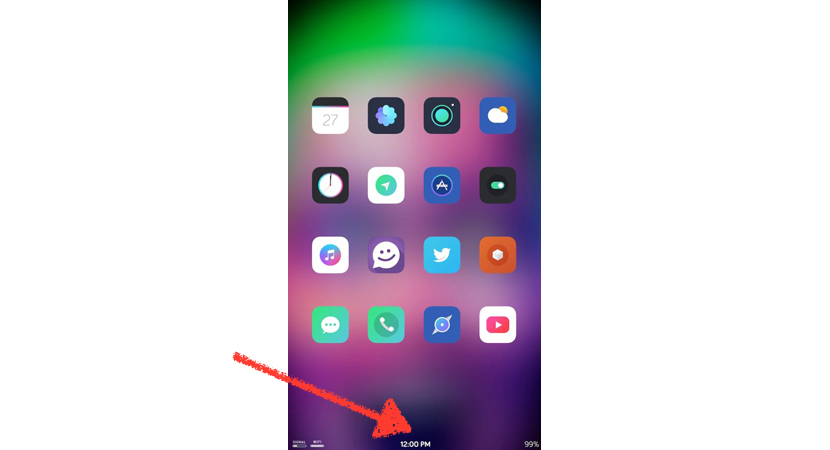
Thanks to the tweaks available in Cydia can customize our terminals as best we look. Can add themes that change by full it interface and them icons of the main applications, also also can modify the access to the multitasking, add funds animated, use gestures in the screen for not depending upon of them buttons of home and off… but also can make use of tweaks that us allow improve our productivity when spent many hours with the phone in our hands. Today speak of a tweak that you allows change the location of the bar of State of our iPhone, passing of the part upper of the screen to the part lower. We are speaking of BottomBar.
The bar of State is very useful at the time of offer us information related with the connections that have activated in our devices, in addition to show us the level of battery, the signal of the operator… The bar of State is located in the part upper of the screen since is the access more near to the view that have when do use of any device (all them systems operating mobile it located in the same place). But if ever you’ve thought if there is the possibility of change of position to the bottom of the screen, the answer is if.
As it suggests the name, BottomBar allows us to move the status bar at the bottom of the screen, leaving a blank space at the top, where you will usually find. A time we have installed the tweak, the only option that us allows set up is that this function is active or not. This tweak only works when we are on the springboard or in any folder container of applications. A time run a game or application, if received any notification, this will be shown from the part superior of the screen.
This tweak is available for free download through Lydia and is compatible with iOS 9.3.3 and earlier versions.


